🔁 Section 05. Lesson 3 Iteration, Direction, Fill Mode
📝 Summary of What You Will Do in This Section
In this section, your main goal is to control how CSS animations behave over time. You will create lesson-03-iterations-direction-fill.html and compare three important animation behavior settings: how many times an animation repeats, whether it changes direction, and whether the final frame stays visible after it ends.
By the end of this section, you will understand how the same motion can feel very different just by changing animation behavior properties. You will still include the shared js/main.js file for restart buttons, but JavaScript is only helper code. The learning target in this section is CSS animation behavior.
✅ Checklist of What You Need to Do
- Create
lesson-03-iterations-direction-fill.htmlin your project root. - Type the full lesson file by hand, including the
<style>block. - Keep one shared
@keyframes sweeprule and compare behavior through animation settings. - Focus on
animation-iteration-count,animation-direction, andanimation-fill-modein the three demo rules. - Make sure the page links to both
css/styles.cssandjs/main.js. - Test each Restart button and observe how each behavior rule changes what you see.
- Keep JavaScript in helper mode; no new JavaScript code is required in this section.
🧠 Core Concepts
This lesson teaches that CSS animation is not only about where an element moves, but also about how long the movement continues and what happens after it finishes. Your keyframes define the path from left to right, but behavior properties decide whether that movement repeats, reverses, or holds on the final frame. This is a major step in animation control because it moves students from “simple motion” to “motion behavior design.”
animation-iteration-count controls repetition. If the count is 3, the animation runs three full cycles and then stops. animation-direction controls playback flow. When set to alternate, one cycle plays forward, then the next cycle plays backward, creating a back-and-forth feel. animation-fill-mode controls what happens when motion ends. With forwards, the element keeps the final keyframe appearance instead of snapping back.
You are also learning how to read animation shorthand more confidently. Even though shorthand can look dense, each value has a job. This section helps you see those values as meaningful controls, not just a random string of words. That skill becomes more important in later sections when multiple animations run together.
💻 Code You Will Write in This Section
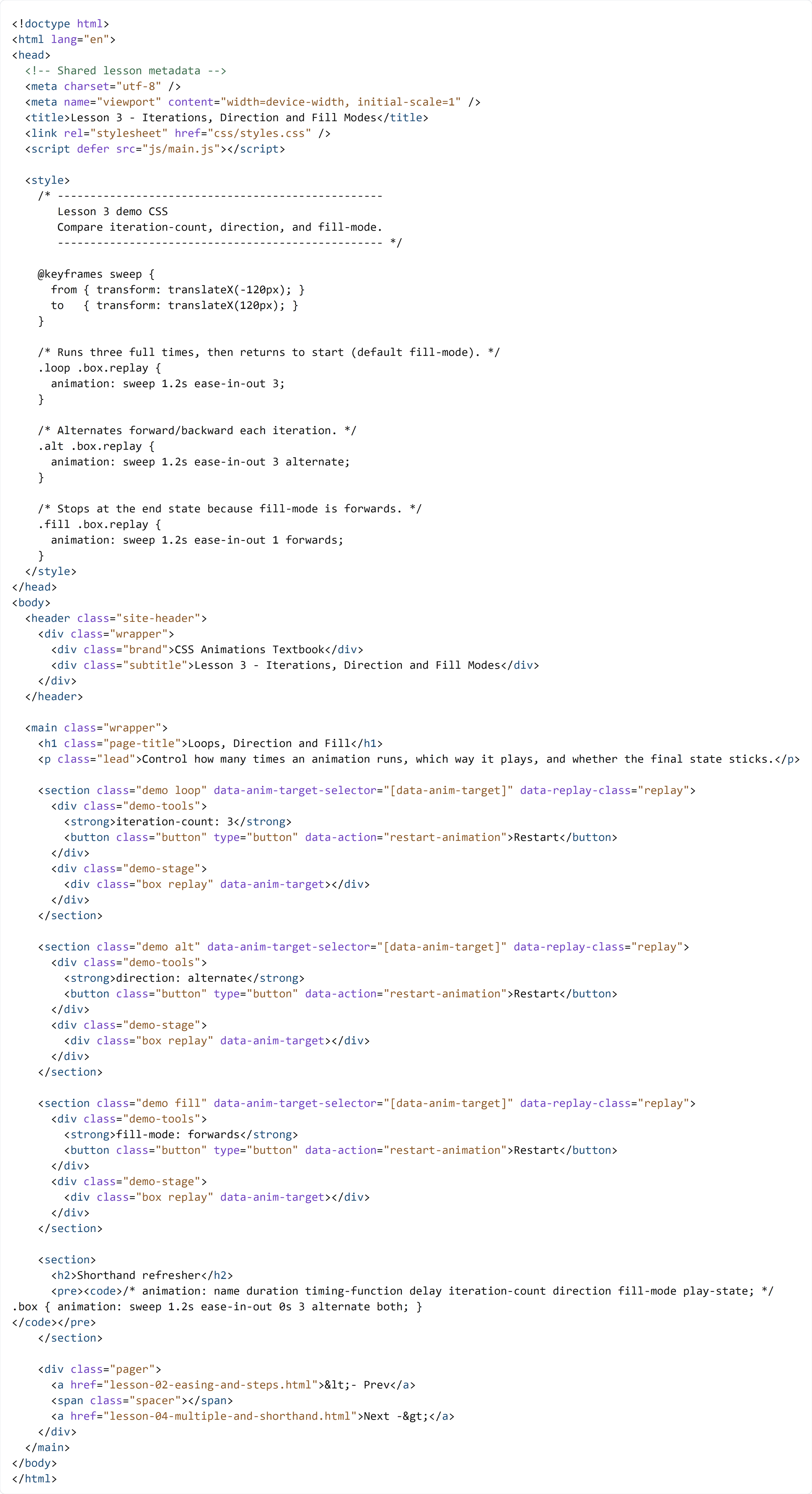
HTML + CSS (lesson-03-iterations-direction-fill.html)
Create lesson-03-iterations-direction-fill.html in your project root and type the full file below by hand.
You are adding the entire Lesson 3 page in this section. In Section 06, you will create lesson-04-multiple-and-shorthand.html and learn how to run multiple CSS animations on one element.
🔍 Key Concepts
Inside the <style> block, all three demos share one @keyframes sweep rule. That is important because it keeps the motion path constant so students can compare behavior settings fairly. The .loop, .alt, and .fill animation rules then change behavior values, not the path itself. This is a clean teaching setup because you are isolating one kind of change at a time.
In .loop .box.replay, the shorthand ends with 3, so the animation runs three times and then returns to its default visual state. In .alt .box.replay, the added alternate changes playback direction every cycle, which creates a more pendulum-like movement pattern. In .fill .box.replay, the forwards value keeps the final visual frame after motion ends, which is useful in interfaces where you want a completed state to remain visible.
In the HTML structure, each demo section follows the same pattern you already know: one restart button, one stage, one animated target. That consistency helps you focus on CSS behavior differences instead of new markup complexity. The shared JavaScript file only restarts the demos so you can replay and compare what each CSS setting does. The animation logic itself still lives in CSS.